Put your Google reviews and YouTube videos on any website
Most small businesses already have the proof a new customer wants to see. It sits in a pile of Google reviews and a YouTube channel. Getting it onto the website is the hard part. Plugins only work on one platform, embed codes break when something upstream changes, and some widget services switch your feed off once a post brings in more visitors than your plan allows.
So we built TileSet, and today it is open to everyone. You connect a source once. TileSet keeps it connected, refreshes it on the schedule you pick and serves it from close to your visitors. You get back one snippet that renders the same on WordPress, Shopify, Squarespace, Webflow, Wix, plain HTML or a site an AI tool generated for you. It comes from the team behind Smash Balloon, whose WordPress feed plugins run on more than 1.75 million sites.
What you can do with it
- Show your Google reviews next to the booking button, as a review wall with a rating summary and a Leave a review button that opens Google’s review form for your business. On Growth and up, filter them by star rating, by reviews with photos, or by a word like “wedding” or “brunch”.
- Show your YouTube uploads as a grid, a carousel or a masonry wall. Mix Shorts in, leave them out or show only Shorts, and let visitors watch in a lightbox without leaving your site.
- Make a Link in bio page: one address for your Instagram, TikTok or other profile bio, with your link buttons, social icons and live blocks from your sources: your latest videos, your newest one as a featured card, and your star rating with a recent review that changes every hour. It counts clicks and views, gives you a QR code to print, and uses no credits. One page is free; on Starter and up you choose your own address, like app.tileset.com/@yourname.
- Let your AI agent do the install. TileSet has an MCP server, so Claude, Cursor, Lovable and other agents can connect a source, build the widget, place it on the page and check that it shows. Copy and paste works too, if you would rather do it yourself.
The live examples show real widgets, served right now. On your own site, a widget is these two lines, with your widget’s id in them:
<script src="https://app.tileset.com/v1/tileset.js" async></script>
<div data-tileset="w_..."></div>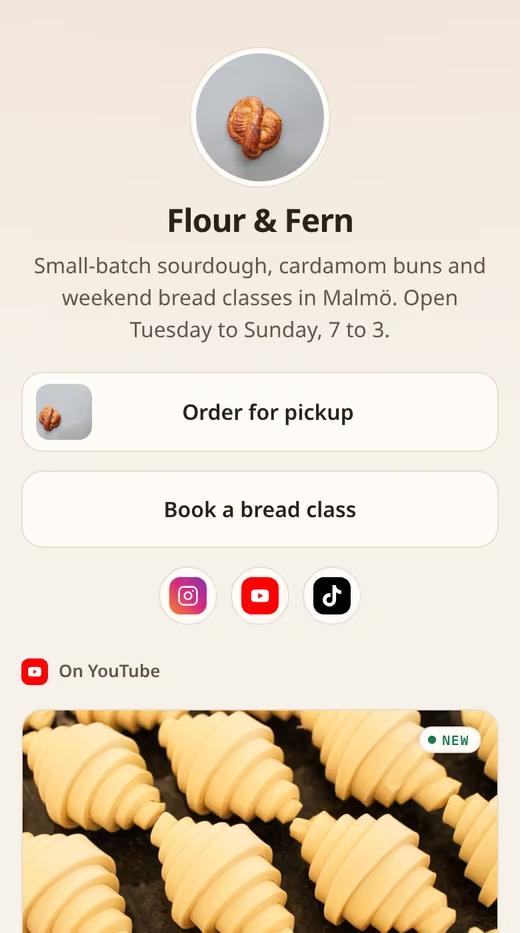
These are prompts we ran against TileSet before writing this. Swap in your own details:
- “Add my YouTube channel @yourchannel to my homepage with TileSet.” The agent connects the channel, makes a video grid and hands back the snippet to paste.
- “Show my Google reviews on my contact page with TileSet. The business is Your Bakery, Springfield.” When a name matches, the agent shows you the business it found and connects it once you confirm.
- “Make me a TileSet Link in bio page called Your Bakery.” You get the page and its address straight away, ready to add blocks to.
Who this is for
Mostly for business owners whose website is not on WordPress: Shopify, Squarespace, Webflow, Wix, or something built in Lovable. Our WordPress plugins already cover WordPress well, and TileSet works there too.
Agencies are the other half. If you build client sites on three different platforms, you get one widget tool and one login for all of them, instead of a different plugin per stack.
How to set it up
- Sign in with Google. There is no password to create, and the free plan needs no card.
- Add a source: paste your Google Maps link or type your business name, or type your YouTube @handle.
- Build a widget. Choose a layout, how many columns and items to show, and light or dark. The preview on screen is what your visitors will see.
- Copy the snippet into your site, or ask your agent to. Then press Check my page on the widget’s Install tab, and TileSet tells you whether the script, the widget and its content are there, and how to fix what is not.
Why you can trust it
Platforms have bad days. When Google or YouTube is slow or limits us, your widget keeps showing the last reviews and videos we fetched. Your visitors see your reviews and videos, and nobody sees an error card.
We never count page views. There is no view cap for a viral post to hit. What you pay for is how often your sources update, in credits, and the dashboard shows what each speed costs before you pick it. The free plan comes with 60 credits a month and updates each source up to once a day.
Your AI agent sets up and changes widgets, but no tool and no API key hands it your content: it gets counts to choose a design from, and a preview link to look at the result. Settings has a button to export everything we hold about your account, and one to delete the account.
The widget script is under 10 KB compressed, loads after your page and sets no cookies on your visitors.
What is next
This is a small start on purpose. A new source or feature arrives every few days from here, each with a post on this blog and an entry in the changelog, and the roadmap lists what comes in order. X posts are first, then customer testimonials and social walls that mix several sources in one widget.
Smash Balloon has only ever worked on WordPress. TileSet is how the same proof gets onto every other kind of site. Try it, and tell us what breaks.
Joel and the TileSet team